Posts

2007 Dodge Caliber - Fixing a Leaking Taillight Bezel Assembly

Image
Our 2007 Dodge Caliber had a taillight that would get foggy looking. We could see water on the inside of the taillight, that couldn't be good for the electrical connectors. I took the light out once (two black plastics "screws" inside the trunk area -then remove the three bulbs from their sockets), emptied it, dried it and looked for cracks. I couldn't find any, so I put it back int the car. Same problem of condensation inside the lens, after the next rain. I figured I had little to loose if I caulked the taillight. First, I made the assembly was fully dry. I used a hair dryer through the bulb holes to get all the condensation out of the taillight. I used 100% silicone bathroom caulk. A good quality sealant, that could be used to seal much tougher things. Here is the taillight removed (shown from the back side). See the two tabs where the screws held it in. Start a silicone bead in the upper part of the Caliber taillight assembly. I filled the channel completel...
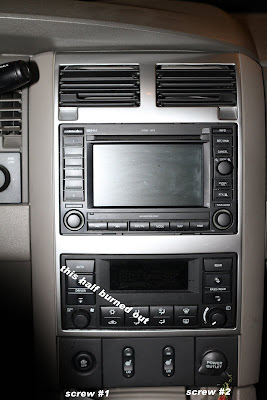
2007 Dodge Durango - Heater / AC Control Instrument Lights Burned Out

Image
Our Dodge Durango heater control dashboard lights went out. One half of the push button lights didn't illuminate at night making it real hard to see what heater control switch you needed to press when it was dark out. Turns out there are regular light bulbs in the dash. The process to replace them takes maybe 15 minutes if your careful and follow directions. I bought led replacement bubs for mine from www.autolumination.com . I ended up ordering part number  Neowedge SMT Led , Color: Green , Lens: Type C Led . Got them shipped to me for less than $10 for two. They are bit hard to find on their web page. I did find that I needed to shave the plastic on the locking tab slightly to get them to lock into the circuit board. Good news is it's unlikely I'll ever have to replace them again. To start the process remove two black screws (9/32 socket) underneath above the storage area. From the bottom carefully pull the whole p...

How to configure Backuppc to automatically backup Smoothwall firewall

I decided it was time to get all my machines on the same backup solution. I've been using  Backuppc  for quite awhile for my Windows boxes, but have been slower to move my Linux machines over. I really was challenged when I tried to backup my smoothwall firewall for my home network How difficult could it be. It's on a linux based operating system. At first I had issues with tar exited with error 65280 () status . All my troubleshooting seemed to point to a permissions error. Ultimately, the process below would have saved me a lot of troubleshooting and on the job learning. 1. Setup SSH public credentials between both machines (see http://backuppc.sourceforge.net/faq/ssh.html  OpenSSH section), so the user that BackupPC runs under can get the proper credentials to connect to the Smoothwall server, without physically typing in a password. 2. Modify the client transfer configuration for the non-standard tar location and SSH port...

50" Samsung DLP HL-P5063W with 3 Flashing Lights on Front

Image
My broken 50" Samsung DLP HL-P5063W has 3 flashing lights (Timer, Lamp, and Stand By/Temp) on the front of it. There is no picture. It tries to start up 3 times and then just has the three flashing lights. Here is my YouTube video of what my exactly what DLP was doing: Many people talked about a loud squealing noise when the color wheel goes bad -although as you can hear in the video -there is some noise there, but it's not really loud. It sounds like the color wheel never gets up to speed -and you could feel pretty significant vibration in the DLP chassis when it was trying to start up. 1. I replaced the lamp (from Amazon) Samsung Replacement Lamp with Housing for Samsung DLP TV 2. Then the Samsung BP47-00037A Lamp Ballast / Driver | BP47-00033A BP47-00029A ballast from Discount Merchant ( http://www.discount-merchant.com/p-146818-samsung-bp47-00037a-lamp-ballast-driver-bp47-00033a-bp47-00029a-bp47-00029a-1-468-927-12.aspx or Amazon - Samsung BP47-00037A ...

Comcast Xfinity DVR App for Android Phones

Just got my email notice for Comcast Xfinity application for Android phones. Surprisingly it didn't take Comcast long to get their Android version of their application out after the debut of the iPhone application.Why Comcast didn't include the QR code to download the application in the market I'm not sure. Searching for Xfinity in the Android market as suggested quickly found the application.Comcast explains it all here: http://www.xfinity.com/help/internet/mobile-android/?xcr=1 After downloading it I gave it my Comcast account information and zip code. The TV listings were brought down to my phone quite quickly after selecting the cable system I'm on. The application then asked me if I'd like to synchronize it with my DVR. I had previously set this up to program my DVR from my computer. It also worked flawlessly. Now I can schedule my TV recordings from anywhere on the planet. Thanks Comcast -perhaps I won't move away from your services quite so q...

Fixing a Dropped Canon EF 50mm f1.8 II Camera Lens

Image
My daughter tipped over our Canon 40D camera (on our very sturdy  Manfrotto tripod ) while getting freaked out by a thunderstorm. The lens took a header and "fell apart". This lens in our favorite lens. Unfortunately, it is inexpensive (<$100), so there was probably no point in having it repaired by a service center. My only choice was to buy a new one -or fix it myself. Buying new? I started to look for new lenses. I considered the Canon EF f1.4 from Amazon , but it was just a bit to pricey at $349 from Amazon. A new Canon EF 50mm f1.8 from Amazon had gone up since I bought it, but was still a reasonable $100. Well I figured those were my best two new alternatives, unless I fixed it. Fixing the 50mm f 1.8 lens: I did try just "putting the lens back together" -that wouldn't work. Nothing just snapped into the right place. I found some great advice from this Flicker post about a broken 50 mm 1.8 . I decided I had nothing to loose, so I followed the 50...

Pan Newsreader and Multi-part Images in Kubuntu 10.4 Lucid Lynx

I got frustrated at not being able to view multi-part images directly in Pan newsreader . I could save them to my local system and view them, but that's too many steps. For whatever reason this bug has been around for at least 6 months. I started with the article from http://www.scottkuma.net/pan-newsreader-and-multi-part-images-in-ubuntu-9-10-karmic-koala , but had to make some changes to support the latest version of Kubuntu (10.4 Lucid Lynx) . First, I needed to install a number of application to support the building of Pan on my Kubuntu 10.4 version. $ sudo apt-get install pan gitk gnome-common libgtk2.0-dev libpcre3-dev libgmime-2.4-dev build-essential kde-devel subversion libncurses5-dev libtag1-dev libqca2-dev libstrigiqtdbusclient-dev libstreamanalyzer-dev I removed git and git-core -and added several kubuntu specific libraries to the install list. I think I needed all of them, but I'm not completely sure. Kubuntu then required a restart. After that I followed t...